
How to Download Your Theme Package from ThemetechMount Store – Support

How to Download Your Theme Package from ThemetechMount Store

 11 Views

How to Download Your Theme Package from ThemetechMount Store

If you've recently purchased a theme from ThemetechMount Store and are unable to find the theme package, don't worry. Your purchased theme package is available in your account dashboard and can be downloaded in just a few clicks.

Follow the steps below to download your latest theme package.

Step 1: Log in to Your ThemetechMount Store Account
Step 2: Open the Downloads Page

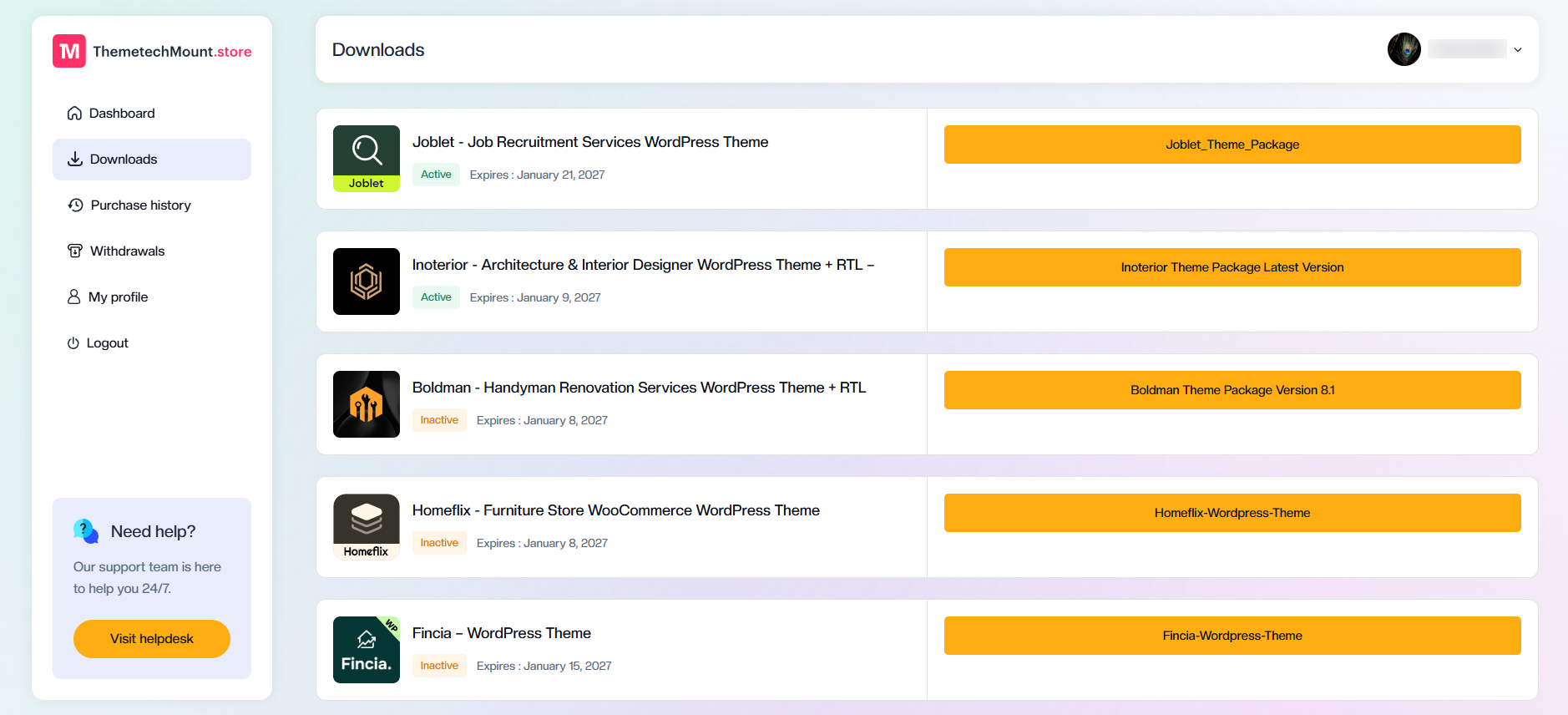
After logging in, click Downloads from the left sidebar.
On this page, you'll see all the themes you've purchased along with their license status and expiration date.

Step 3: Download the Latest Theme Package

Locate the theme you want to download.
On the right side, you'll find a large button displaying the latest available version of your theme package.
Click the download button to start downloading the latest theme package.

What's Included in the Theme Package?

The downloaded package typically contains everything you need to get started, including:

Yes. You can download your purchased theme package anytime while your license remains active.

Whenever a new theme update is released, the latest Theme Package will automatically be available on your Downloads page. Simply download the latest package from your ThemetechMount Store account and update your website.

Yes. The theme package generally includes the installable theme, child theme, required plugins, and documentation.